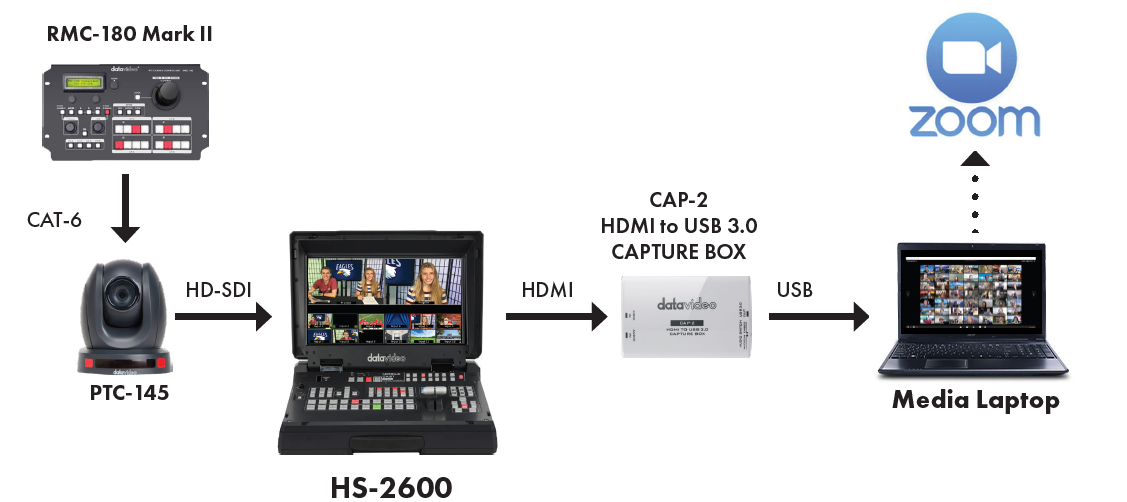
If your school participates in hybrid learning, you will still want the students learning from home to see and enjoy your morning announcement shows. So, how do we send our production to a video conferencing program like Zoom or Microsoft Teams? In chapter 3, we learned how to share your production by streaming to YouTube. We used a streaming encoder that is built into the HS-2600 to stream to a CDN (YouTube) to share with our audience. But if we want to share with our audience on a Zoom or a Teams call, we'll need a piece of equipment that will take an HDMI output from the HS-3200 switcher and convert it to USB so that you can upload it live to a computer. With this piece of equipment, the computer will interpret the signal from the HS-2600 as a webcam to display on Zoom or Teams. It's called CAP-2 and it is included in the Datavideo bundle.
CAP-2 is a capture device that takes an HDMI signal and converts it to a USB 3.0 connection, allowing you to send your signal from a video switcher or a camera to your computer. Once the CAP-2 is connected to the computer, it sees the CAP-2 as a camera input. When you open Zoom or Teams, select UVC USB 3.0 CAPTURE DEVICE as your camera.
After that, you can begin your meeting when you are ready to begin your production. All of your equipment is connected the same way you’ve always had it connected for streaming your news shows. In order to send to Zoom/Teams, simply add the CAP-2 to your workflow.