How to Use Autocast Mini

Designed For Small to Medium-Sized Meetings and Presentations
Avatar
Sam Huang
Instructor

introduction:

The Secretary of the Taiwan Multimedia Creative Teaching (TMCT) Association and Director of the Taiwan Microlecture Association, Sam has been an audio and video professional for 20 years. Sam is a master in scriptwriting, videography, live video production, non-linear editing, and live video streaming. As the Secretary and Director of two associations, both educational NGOs, Sam has a strong passion for media education. He has many years of teaching experience in the College of Communication as a professional lecturer.

Skills: Scriptwriting, videography, live video production, non-linear editing, and live video streaming.

Experience: Many years of teaching experience in the college of communication as a professional lecturer.

Course category

About the course

Datavideo Autocast Mini
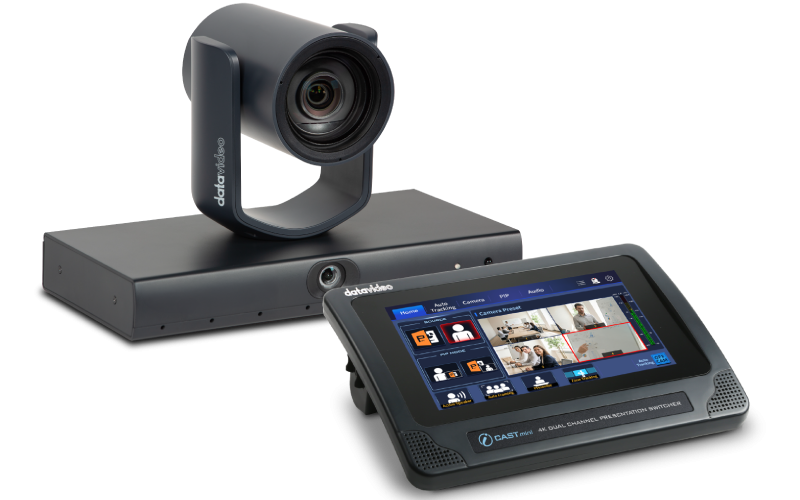
Datavideo Autocast Mini is specifically designed for small to medium-sized meetings and presentations, delivering a highly efficient, professional, and user-friendly solution.  

The VTC-100 is equipped with AI-powered voice tracking technology and a dual-lens design, providing both a wide-angle panoramic view and a close-up lens. It automatically detects and frames the active speaker in real time, ensuring smooth and natural video output without the need for manual operation.

The iCAST mini can seamlessly switch images, making the presentation process more transparent and more professional. Whether for corporate meetings, educational training, or hybrid meetings. This bundle enables users to easily set up an intelligent conference environment, achieving professional video production and highly efficient communication with minimal effort.

Designed For Small to Medium-Sized Meetings and Presentations
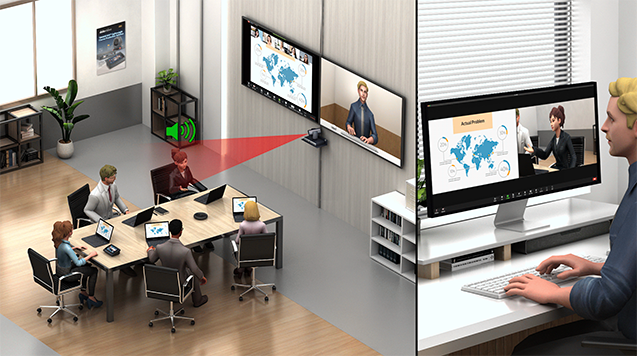
At the core of the system, the iCAST mini combines video switching, audio mixing and camera control into one compact unit. Its intuitive touchscreen interface makes operation effortless, even for non-technical users. With multiple HDMI inputs, USB connectivity, and advanced picture-in-picture layouts, it enables smooth content sharing—whether showing slides, speaker views, or a combination of both—ensuring broadcast-quality results without the need for complicated equipment.

The VTC-100 enhances this solution with AI-driven voice tracking technology and a dual-lens design. One lens provides a broad panoramic view, while the other captures close-up PTZ shots. By automatically detecting and framing the active speaker in real-time, the VTC-100 eliminates the need for manual camera control, ensuring a fluid, clear, and professional video output.

Together, the iCAST mini and VTC-100 form a complete intelligent production system that streamlines workflows and enhances audience engagement. Perfect for corporate meetings, educational training, and hybrid conferences, this bundle enables users to set up a polished, efficient, and professional video environment with minimal effort, elevating communication and collaboration to a new level.

For more product info, please go to:

httphttps://datavideo.com/global/product/Autocast+Mini

https://datavideo.com/global/product/VTC-100

https://datavideo.com/global/product/iCAST+mini

What you will learn

This course primarily explains how to set up a video conferencing solution for small to medium-sized online and offline meetings, including the equipment used, hardware wiring, software connections, and the basic operation methods of the core equipment VTC-100 and iCAST mini, allowing users to quickly get started with Autocast Mini.

Background knowledge, skills and tools needed for this course

Operating the Datavideo Autocast Mini for corporate training requires basic technical literacy rather than professional broadcasting expertise. Key areas include understanding video connectivity (HDMI/USB), fundamental networking for RTMP streaming, and audio management to ensure clear voice capture. Users should also grasp the logic of camera presets and screen layouts—such as Picture-in-Picture—to maximize the device’s automation. Overall, if you are comfortable managing standard video conferencing tools like Zoom or Teams, you can easily master this system to deliver seamless, high-quality internal presentations and training sessions independently.

Who is suitable for this course

The Datavideo Autocast Mini is the perfect solution for corporate trainers and administrative teams looking to streamline internal communications. It simplifies professional-grade broadcasting for webinars and product training by automating the switch between speakers and presentation materials. Its intuitive interface allows staff to manage high-quality live streams and recordings independently, ensuring seamless knowledge transfer and corporate engagement without the need for a dedicated technical production crew.

Standard to pass this course

  • Course completion 100%
The evaluation will not be displayed yet because it has not been reviewed by 5 students yet
Can only be evaluated when 1/3 of the course is completed